Digidraw Graphics Tablet – Get Offer Price from Multimedia Kingdom
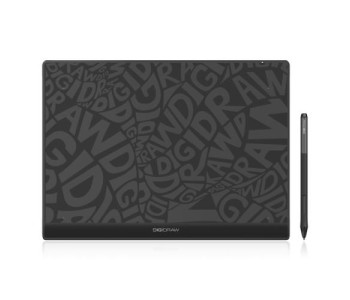
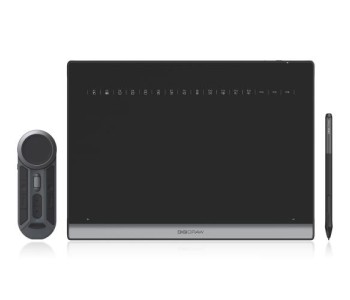
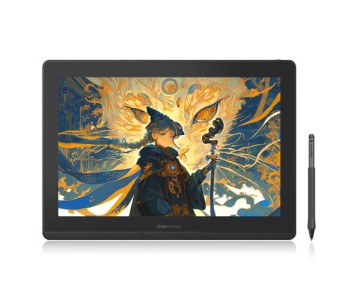
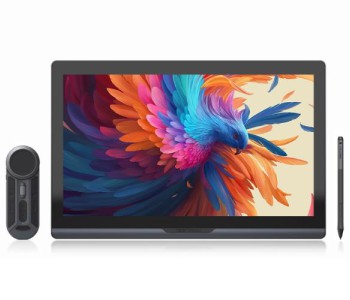
Switching from paper to a digital canvas shouldn't mean fighting with laggy cursors or a stylus that doesn't feel right in your hand. That's exactly the gap Digidraw is built to close. Multimedia Kingdom is the exclusive distributor of Digidraw in Bangladesh, and we carry the full lineup — from compact, budget-friendly Digidraw Drawing Tablet and Digidraw Pen Tablet models to full-size, high-resolution Digidraw Digital Drawing Tablet screens made for daily professional use.
Students learning digital sketching, freelance illustrators, animators, and graphic designers moving their workflow to a tablet all land on Digidraw for the same reason — the Digidraw Graphics Tablet Bangladesh lineup is built to feel natural and responsive, without the price tag of imported premium brands.
Why Choose Digidraw Graphics Tablet?
The Best Digidraw Graphics Tablet models are built around one core idea: your hand movement should translate to the screen instantly, accurately, and without lag. Every Digidraw Graphics Tablet with Stylus in this lineup features a battery-free pen with up to 16384 levels of pressure sensitivity, giving you fine control over line weight, shading, and brush texture — the kind of nuance professional illustrators and concept artists rely on daily.
Key reasons creators across Bangladesh trust Digidraw:
- High-precision drawing performance with minimal parallax and jitter
- Advanced pressure sensitivity for natural pen-on-paper feel
- Smooth, responsive tracking across the entire active area
- Broad software compatibility with the tools you already use
- Lightweight, ergonomic build for long working sessions
- Simple plug-and-play setup — no steep learning curve
Digidraw Graphics Tablet Features & Specifications
Across the range, the Digidraw Graphics Tablet Specifications are tailored to different creative needs — from compact pen tablets for note-taking and quick sketches to large-format pen displays for professional illustration and animation studios.
Core Digidraw Graphics Tablet Features include:
- Pen Pressure Sensitivity: Up to 16384 levels for ultra-smooth gradients and line control
- Active Drawing Area: Ranges from compact 6×4" tablets to large 18.4" pen displays
- Connectivity: USB wired and Bluetooth 5.0 wireless options
- Compatibility: Works seamlessly with Windows, Mac, and Android devices
- Screen Resolution (Pen Display models): Up to 2.5K and 4K UHD for crisp, true-to-life color
- Express Keys: Programmable shortcut keys on select models for a faster workflow
- Battery-Free Stylus: No charging needed, always ready to draw
This makes Digidraw one of the most versatile choices if you're comparing a Digidraw Graphics Tablet for Windows or a Digidraw Graphics Tablet for Mac setup — the same tablet works across both operating systems without compatibility issues.
Check Updated Digidraw Graphics Tablet Price list in Bangladesh
One of the biggest advantages of shopping with Multimedia Kingdom is transparent, competitive pricing. The Digidraw Graphics Tablet Price in Bangladesh starts from an entry-level, student-friendly range and scales up to professional 4K pen display tablets — so there's a model for every budget and skill level.
Prices and stock availability are updated regularly on our website — visit the Digidraw Graphics Tablet page for the latest offers.
This makes it easy to find an Affordable Digidraw Graphics Tablet if you're just starting out, or a Professional Digidraw Graphics Tablet if you need a full pen-display workstation for client work.
Who Is the Digidraw Graphics Tablet For?
The lineup is designed to serve a wide range of creative users:
Digidraw Graphics Tablet for Beginners — The Turing Basic series offers a gentle learning curve with reliable pressure sensitivity, perfect for anyone picking up digital drawing for the first time.
Digidraw Graphics Tablet for Students — Compact, budget-friendly, and durable enough for daily classroom or dorm-room use, whether for note-taking, design coursework, or digital sketching practice.
Digidraw Graphics Tablet for Artists — Larger active areas and consistent pen accuracy support detailed illustration, concept art, and fine-line work.
Digidraw Graphics Tablet for Graphic Design — Precise cursor control and broad software support make it easy to move between layout, retouching, and vector work.
Digidraw Graphics Tablet for Digital Art — From flat colors to layered shading, the pressure-sensitive stylus captures subtle strokes that a mouse simply can't replicate.
Digidraw Graphics Tablet for Illustration — Ideal for character design, comic art, and detailed linework thanks to accurate tip response.
Digidraw Graphics Tablet for Animation — Smooth tracking across the active area supports frame-by-frame work and keyframe sketching.
Digidraw Graphics Tablet for Photoshop and Digidraw Graphics Tablet for Illustrator — Fully compatible with Adobe's creative suite, along with Clip Studio Paint, Procreate-style workflows on supported devices, and other major digital art software.
Digidraw Graphics Tablet with Pressure Sensitivity — Built for Real Creative Work
Every model in this lineup is a genuine Digidraw Graphics Tablet with Pressure Sensitivity, meaning your line weight naturally thickens or thins based on how hard you press — just like a traditional pencil or brush. Combined with tilt-aware stylus response on select models, this gives digital painters and sketch artists a far more intuitive experience than a standard mouse-and-keyboard setup.
Digidraw Graphics Tablet Review — What Users Notice First
Based on feedback from students, hobbyists, and working designers who've switched to Digidraw, the most commonly praised points are:
- Fast, accurate cursor tracking straight out of the box
- Comfortable, lightweight design for hours of continuous use
- Reliable Bluetooth wireless connection on the Smart series
- Sharp, color-accurate displays on the pen-display models (Turing 14 2.5K and Turing Pro 19 Touch)
- Simple driver installation on both Windows and Mac
If you're comparing a Digidraw Graphics Tablet Review against other brands, the combination of specification, build quality, and local after-sales support through Multimedia Kingdom is what consistently stands out.
Buy Now Digidraw Graphics Tablet Online from Multimedia Kingdom
As the Exclusive Distributor of Bangladesh for Digidraw, Multimedia Kingdom guarantees that every unit you purchase is a genuine, warranty-backed Original Digidraw Graphics Tablet — not a grey-market import. When you Buy Digidraw Graphics Tablet Online through our store, you get:
- 100% authentic, brand-new stock
- Official manufacturer warranty support
- Nationwide delivery across Bangladesh
- Dedicated after-sales service from our Dhaka showroom
- Easy online checkout with cash-on-delivery and digital payment options
Browse the full Digidraw Graphics Tablet BD collection, compare active area sizes, pen pressure levels, and connectivity options, and choose the model that fits your creative workflow — all in one place
Frequently Asked Questions
Is Digidraw Graphics Tablet compatible with Windows and Mac?
Yes. Every Digidraw model in this range supports Windows, Mac, and Android, so you can switch devices without losing functionality.
What is the price range for Digidraw Graphics Tablet in Bangladesh?
Pricing starts from an affordable entry-level tier for beginners and scales up to premium 4K pen-display tablets for professional studios. Check the Digidraw category page for current prices.
Where can I buy an original Digidraw Graphics Tablet in Bangladesh?
Multimedia Kingdom is the official exclusive distributor of Digidraw in Bangladesh, offering genuine products with warranty support through our online store and Dhaka showroom.
Does Digidraw support pressure sensitivity for digital painting?
Yes, all models feature up to 16384 levels of pen pressure sensitivity for natural, responsive drawing and shading.
Explore the complete range of Graphics Tablets, Ereader, E-ink devices, tablet, audio and others itemat Multimedia Kingdom — Bangladesh's trusted destination for genuine creative technology.