Signature Pad
- Active Area: 3.50" x 2.09"
- Power Source: USB 2.0
- Report Rate: 100 counts per second
- Bundled with IntegriSign software for Acrobat, MS Word and Excel
- Active Area: 3.77″ x 2.36″
- Resolution: 320 x 200 pixels
- Pen Pressure: 1024
- Color: Grey
- Active Area: 3.50" x 2.09"
- Power Source: USB 2.0
- Legally-binding eSignatures
- Report Rate: 100-200 counts per second
- Active Area: 4.25″ x 2.56″
- Resolution: 800 x 480 pixels
- Pen Pressure: 1024
- Color: Black
- Active Area: 3.0" x 2.2"
- Power Source: USB 2.0
- Monochrome LCD display
- Report Rate: 100 counts per second
- Active Area: 10.1″
- Resolution: 1024 x 600 pixels
- Pen Pressure: 512
- Color: Black
- Active Area: 3.74" x 2.12"
- Full-color LCD display
- USB powered, portable device
- Report Rate: 100-400 counts per second
- Active Area: 8.8″ x 4.9″
- Resolution: 1920 x 1080 pixels
- Pen Pressure: 1024
- Color: Black
- Active Area: 8.79″ x 4.94″
- Resolution: 1920 x 1080 pixels
- Pen Pressure: 1024
- Touch: Yes
- Active Area: 13.55″ x 7.62″
- Resolution: 1920 x 1080 pixels
- Pen Pressure: 8192
- Color: Black
- Active Area: 20.75″ x 11.65″
- Resolution: 1920 x 1080 pixels
- Pen Pressure: 2048
- Color: Black
- Active Area: 20.75″ x 11.65″
- Resolution: 1920 x 1080 pixels
- Pen Pressure: 2048
- Touch: Yes
Signature Pad Price in Bangladesh: Best Price at Multimedia Kingdom
Signature pad price in Bangladesh currently ranges from 24,999 ৳ to 201,499 ৳ across the models listed at Multimedia Kingdom. Prices may change over time, so please visit the actual category page and check the latest price before you buy.
A signature pad lets a customer sign on a pressure-sensitive surface with a pen. The device captures the signature digitally, so you can attach it to a form or contract on your computer. No printing, no scanning and no paper files to store.
The range is wide, from compact pads to large pen displays. This guide explains the differences in simple words so you can pick the right model for your work.
Why Bangladeshi Businesses Are Moving to Digital Signing
Banks, hospitals, telecom outlets, courier desks and corporate offices collect many signatures every day. Paper forms slow down the queue and take up storage space. A signature pad cuts those steps. The customer signs once, and the signature goes straight into the document on your PC.
A digital signature also keeps more than the final shape. Many pads record pen pressure and speed, which helps the signing feel natural. Some models add data protection features, which matters when you handle customer records.
Three Types of Signature Devices You Will See in the Market
Not every device sold under this name works the same way. Knowing the three main types will save you from paying for features you do not need.
Compact Signature Pads
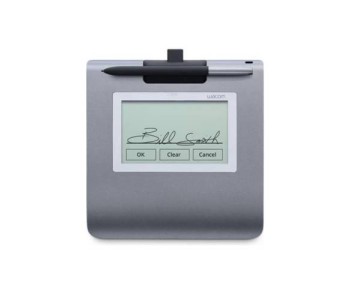
These are small, USB-powered pads with a signing area of about 3 to 4 inches. They suit counters where people only need to sign a receipt, a delivery slip or a simple form. They are portable, easy to set up and do not take much desk space.
Signature Pads With a Display
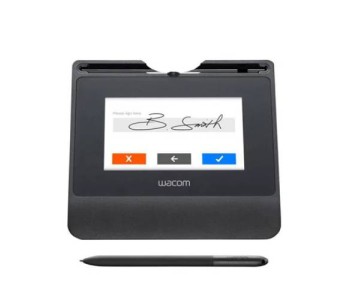
Some pads show the signature on a built-in LCD screen as the person writes. This gives the signer confidence that the pen is working. Models with a color display can also show prompts or short messages.
Pen Displays for Signing and Document Review
Larger pen displays let the customer read the full document on screen and sign right there. They are more expensive, but they work well in places where people need to review long agreements, such as insurance, legal and corporate settings. Some of these models also work as creative tools, so they suit design teams too.
Signature Pad Models at Multimedia Kingdom
Our collection currently includes Wacom and ePadLink devices. Browse the full Wacom signature pad collection or the ePadLink signature pad collection to compare everything in one place.
ePadLink Options
- The ePadLink ePad VP9801 is a simple USB 2.0 pad with a 3.50" x 2.09" active area. It comes bundled with IntegriSign software for Acrobat, MS Word and Excel.
- The ePadLink ePad II VP9851 has the same signing area with a faster report rate of 100 to 200 counts per second.
- The ePadLink ePad-ink VP9805 adds a monochrome LCD display, so the signer can see the signature as it appears.
- The ePadLink ePad-vision VP9808 offers a full-color LCD display and a report rate of up to 400 counts per second.
Wacom Options
- The Wacom STU-430 has a 3.77" x 2.36" active area, 320 x 200 pixel resolution and 1024 pen pressure levels.
- The Wacom STU-540 steps up to a 4.25" x 2.56" area and 800 x 480 pixel resolution, which gives a sharper display.
- The Wacom DTU-1031AX is a 10.1" display with 1024 x 600 pixel resolution.
- The Wacom DTU-1141B and the Wacom DTH-1152 both offer a 1920 x 1080 display. The DTH-1152 also supports touch.
- The Wacom DTK-1660E FHD has a 13.55" x 7.62" active area and 8192 pen pressure levels.
- The Wacom DTK-2451 is the largest option, with a 20.75" x 11.65" active area for shared or presentation-style use.
Every model listed above is currently available on Pre Order. Check the category page for the latest status of each product.
Which Signature Pad Is Right for Your Work?
For Bank Counters and Service Desks
Speed and durability matter most. A compact model such as the STU-430 or the VP9851 handles daily signing without taking much room. If staff need to confirm the signature visually, consider a model with a display.
For Hospitals, Clinics and Pharmacies
Patient consent forms and delivery receipts are common here. A display model helps patients check what they signed. Choose a pad that works smoothly with the software your front desk already uses.
For Corporate Offices and Legal Teams
When people must read contracts before signing, a pen display like the DTU-1141B or DTH-1152 is a better fit. A clear full HD screen reduces the chance of missed details.
For Design and Creative Teams
If you want one device for both signing and drawing, a pen display is worth a look. If your main need is drawing, you can also explore our graphics tablet collection.
Buying Checklist: What to Check Before You Order
- Screen or no screen. A basic pad is enough for simple receipts. A display adds clarity and trust.
- Signing area. A larger area feels more natural, especially for people with long signatures.
- Software support. Check that the device works with your document or banking software. Some models include bundled software, while others may need separate software.
- Operating system. Confirm compatibility with your Windows or macOS version before ordering.
- Pen pressure and report rate. Higher numbers usually mean smoother capture, but a simple counter task may not need the highest level.
- Warranty and local support. A device is only useful if someone can help when something goes wrong.
A Note on Legal Use
Many customers ask whether a digital signature will be accepted for official work. The answer depends on your organization's policy, the type of document and the rules that apply to your industry. Please check with your legal or compliance team before you replace paper signing in an official process.
How Pre Order Works
All the models on our signature pad page are currently on Pre Order. That means the product is arranged for you after you place the order. Please confirm the expected arrival time with our team before you pay, so you can plan your rollout. Multimedia Kingdom is a 100% trusted place for Pre Order, and our team will keep you updated along the way.
Why Select Multimedia Kingdom for buying this Product?
We have 26 years of tech experience, and we are an authorized distributor for selected products. Our team gives always friendly support, whether you are buying one pad for a small shop or planning several units for a branch. Tell us about your daily workflow, and we will help you match it with the right device. You can also visit our showroom at New Elephant Road, Dhaka to see what suits you.
Frequently Asked Questions
What is the difference between a signature pad and a pen display?
A signature pad is a smaller device made mainly for capturing signatures. A pen display has a larger screen where the user can read documents and sign on them directly.
Do I need a computer to use a signature pad?
Yes. The models on our page connect through USB, so they need a compatible computer. Always check the software requirements before you order.
Does a signature pad come with software?
It depends on the model. For example, the ePadLink VP9801 is listed as bundled with IntegriSign software for Acrobat, MS Word and Excel. For other models, please ask our team about software support.
Which signature pad is best for a bank counter?
A compact pad with a display is a common choice, because the customer can see the signature while signing. Your bank's own software and security rules should guide the final decision.
Can I use a pen display for both signing and drawing?
Yes, pen displays can handle both tasks. If drawing is your main need, compare them with graphics tablets as well.
Are digital signatures legally accepted in Bangladesh?
Acceptance depends on the document, the institution and the applicable rules. Please confirm with a legal or compliance professional before using digital signing for official work.
Is the listed stock available immediately?
The models on this page are on Pre Order, so delivery takes time. Please contact our team for the expected arrival date before you place your order.
Get the Right Signature Pad With Confidence
The best signature pad is the one that fits your daily workflow, your software and your budget. Start with how many people sign each day, whether they need to read documents first and which software you use. Then compare the models above.
When you are ready, place your order with Multimedia Kingdom. With 26 years of experience and a friendly team, we will help you choose, order and use your new signature device with confidence.